
A language model, on its own, can only generate text. It can reason about a question, but it can't look up today's weather, query a database, send an email, or create a file. To do any of those things, the model needs to call something outside itself — a tool, a function, an API.
This is, by definition, a remote procedure call. The model produces a structured request ("call function X with arguments Y"), something executes it, and the result comes back. To standardize this communication, the industry has converged on JSON-RPC 2.0. The Model Context Protocol (MCP) is built entirely on JSON-RPC 2.0. Every tools/list, every tools/call, every initialization handshake, every progress notification is a standard JSON-RPC message.
This article explains why JSON-RPC was chosen, how MCP uses it in practice, and — most importantly — how to build your own MCP tool server from scratch.
Note: This is not an exhaustive MCP guide. It is a deep dive into the JSON-RPC mechanics that make MCP work. We will verify the protocol flow by building a minimal tool server from scratch. We will cover the full breadth of the MCP ecosystem in a future dedicated blog series.
1. Why JSON-RPC — Not REST, Not GraphQL, Not gRPC
There were real alternatives. Here is why JSON-RPC is the better fit for LLMs.
1.1 REST requires too many decisions for an LLM
To make a REST call, the model would need to: choose the correct HTTP verb (GET/POST/PUT/PATCH), construct a URL path (/api/v2/weather?location=Tokyo), decide how to encode parameters (query string/path/body), and parse the response based on status codes and content types.
With JSON-RPC, the model simply constructs a single message: the method name and its arguments. The model outputs {"method": "get_weather", "params": {"location": "Tokyo"}} and it's done. No URL construction, no verb selection, no content negotiation.
1.2 GraphQL is for querying, not for actions
GraphQL excels when a frontend needs flexible, nested data fetching — "give me this user's name, their last 5 posts, and the comment count on each." That's a query optimization problem. Agent tool calling is an action problem: "run this function with these arguments." Forcing actions into GraphQL's query/mutation model adds complexity without benefit.
1.3 gRPC requires compilation
gRPC uses Protocol Buffers, which require a .proto schema file and a code generation step. LLMs generate JSON natively — it's their output format. Requiring binary serialization and schema compilation creates a toolchain barrier that JSON-RPC avoids entirely.
1.4 JSON-RPC fits because the mapping is 1:1
When an LLM decides to call a tool, its internal representation is essentially: function name + arguments. JSON-RPC is literally: method + params. There is zero abstraction gap. The model doesn't need to translate its intent into a different paradigm — it directly outputs what JSON-RPC expects.
| LLM concept | JSON-RPC field | REST equivalent |
|---|---|---|
| Tool name | "method": "get_weather" |
URL path + HTTP verb |
| Arguments | "params": {"location": "Tokyo"} |
Query string / body / path params |
| Request ID | "id": 1 |
No standard equivalent |
| Result | "result": {...} |
Response body (check status code first) |
2. MCP Architecture — Three Roles, One Protocol
MCP defines three roles, inspired by the Language Server Protocol:
Host — the application running the LLM (Claude Desktop, an IDE, your custom app). The Host manages one or more Clients.
Client — maintains a 1:1 connection with an MCP Server. The Client is inside the Host process. Each external data source or tool set gets its own Client instance.
Server — exposes capabilities (tools, resources, prompts) over JSON-RPC 2.0. A server might provide weather data, database access, file system operations, or any other functionality.
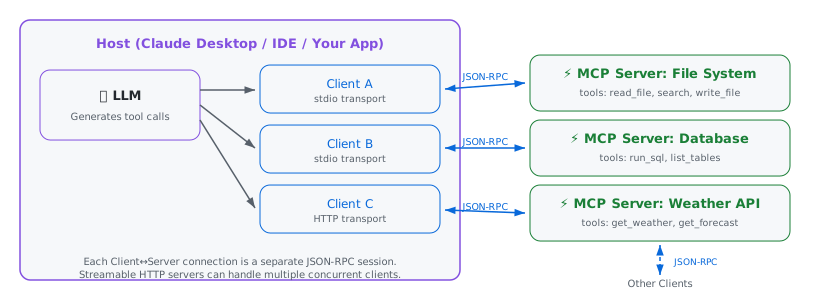
The key insight: each Client↔Server connection is an independent JSON-RPC session. The Host aggregates tools from all connected servers into one flat list that the LLM can browse. When the LLM decides to call a tool, the Host routes the tools/call request to the correct Client, which forwards it to the appropriate Server.
This means adding a new capability to your agent is just connecting to another MCP server. No code changes to the agent logic, no new API integrations — just a new JSON-RPC endpoint.
3. The JSON-RPC Lifecycle — From Handshake to Tool Call
Every MCP session follows a fixed sequence of JSON-RPC messages (see Lifecycle spec). If you've read Articles 1-3, every message type here will be familiar: requests (with id), responses (with result or error), and notifications (no id).
1initialize — capability negotiation
The client sends an initialize request announcing its protocol version and capabilities. The server responds with its own capabilities. This is how both sides learn what the other supports.
// → Client sends initialize request (Simplified)
{
  "jsonrpc": "2.0",
  "id": 1,
  "method": "initialize",
  "params": {
    "protocolVersion": "2025-03-26",
    "capabilities": { "roots": { "listChanged": true } },
    "clientInfo": { "name": "my-agent", "version": "1.0.0" }
  }
}

// ← Server responds with its capabilities (Simplified)
{
  "jsonrpc": "2.0",
  "id": 1,
  "result": {
    "protocolVersion": "2025-03-26",
    "capabilities": { "tools": {} },
    "serverInfo": { "name": "weather-server", "version": "1.0.0" },
    "instructions": "Call tools individually for each city."
  }
}

// OR ← Server rejects incompatible version
{
  "jsonrpc": "2.0",
  "id": 1,
  "error": {
    "code": -32602,
    "message": "Unsupported protocol version",
    "data": {
      "supported": ["2024-11-05"],
      "requested": "1.0.0"
    }
  }
}

// → Client sends initialized notification (no id — fire-and-forget)
{
  "jsonrpc": "2.0",
  "method": "notifications/initialized"
}
The initialized notification has no id — it's a JSON-RPC notification, exactly as the spec defines. The server MUST NOT respond to it. This is the Article 1 notification concept in a real protocol.
The Quiet Period. The spec enforces a strict order. The client MUST NOT send other requests (like tools/list) until it receives a response for its initialize request. The server MUST NOT send requests (like sampling/createMessage) until it receives the initialized notification. The only exceptions are ping and logging.
Capability negotiation. The capabilities objects in both request and response are the gating mechanism for everything in MCP. Presence of a key means the feature is supported; absence means it isn't. The server above declares "tools": {} — meaning it supports the tools primitive. It could also declare "resources": {}, "prompts": {}, or "logging": {}. The client declares what it supports: "roots" for filesystem scoping, "sampling" for server-initiated LLM requests, or "elicitation" for server-initiated user input. Both sides must respect declared capabilities throughout the session — a server can't use sampling if the client didn't declare support for it. This is why the same MCP server can behave differently in different clients: Claude Desktop, Cursor, and VS Code each declare different capability sets.
2 tools/list — discovery
Once initialized, the client asks the server what tools are available. The response contains each tool's name, description, and inputSchema — a JSON Schema defining what parameters the tool accepts.
// → Client discovers tools
{ "jsonrpc":"2.0", "id":2, "method":"tools/list", "params":{} }

// ← Server returns tool definitions
{
  "jsonrpc": "2.0",
  "id": 2,
  "result": {
    "tools": [{
      "name": "get_weather",
      "description": "Get current weather for a location",
      "inputSchema": {
        "type": "object",
        "properties": {
          "location": { "type": "string", "description": "City name or zip code" }
        },
        "required": ["location"]
      }
    }]
  }
}
This inputSchema is the contract between the LLM and the tool. The LLM reads the schema (the descriptions, the types, the required fields) and uses it to construct correct arguments. If the schema says "location" is a required string, the model knows to include it. This is why good descriptions matter — the LLM literally reads them to decide how to call your tool.
Writing good tool descriptions
The description field is not a code comment for developers. It is a prompt for the LLM. Write it as an instruction: "Get current weather conditions for a specific city. Use this when the user asks about temperature, rain, or forecast." Be specific about when the tool should and should not be used. This directly affects how reliably the model selects the right tool.
Named params only
Notice that every MCP message uses named parameters (Objects), never positional (Arrays). The inputSchema is a JSON Schema for an Object with named properties. When the LLM calls a tool, it generates "arguments": {"location": "Tokyo"}, not "arguments": ["Tokyo"]. This maps directly to the named params advantage from Article 1: self-documenting, order-independent, and safe to extend with new optional fields.
3tools/call — invocation
When the LLM decides to use a tool, the client sends a tools/call request with the tool name and arguments:
// → Client invokes tool
{
  "jsonrpc": "2.0",
  "id": 3,
  "method": "tools/call",
  "params": {
    "name": "get_weather",
    "arguments": { "location": "Tokyo" }
  }
}

// ← Server returns result
{
  "jsonrpc": "2.0",
  "id": 3,
  "result": {
    "content": [{ "type": "text", "text": "Temperature: 72°F, Partly cloudy" }],
    "isError": false
  }
}
Two things to notice.
- First, the response wraps the result in a
contentarray with typed entries — this allows tools to return text, images, or structured data. - Second, there's an
isErrorboolean that distinguishes tool execution failures (the tool ran but failed) from protocol errors (the tool name doesn't exist). A protocol error uses JSON-RPC's standarderrorfield. A tool execution failure usesresultwithisError: true. This is a deliberate MCP design choice — it lets the LLM see the error, reason about what went wrong, and retry with different arguments. A protocol-level error would just surface as a generic failure. IfisErroris not set, it is assumed to be false (success).
4 Bidirectional Requests (Sampling)
The most unique feature of JSON-RPC in this context is that it's peer-to-peer. The "Server" can send requests to the "Client". MCP uses this for Sampling (sampling/createMessage).
In this flow, the MCP Server asks the Host app to run a prompt against the Host's LLM and return the text. This allows a lightweight server (like a code analyzer) to use intelligence ("Summarize this function") without needing its own API key.
// → Server sends request to Client (reverse flow!)
{
  "jsonrpc": "2.0",
  "id": 99,
  "method": "sampling/createMessage",
  "params": {
    "messages": [{ "role": "user", "content": { "type": "text", "text": "Explain this code..." } }],
    "maxTokens": 100
  }
}
This is impossible in standard REST (where servers can't "call" clients). But in JSON-RPC over a persistent connection, it's just another message. This same bidirectional channel powers the new MCP Apps feature (where servers push UI components) and Tasks (where servers push async status updates).
MCP's JSON-RPC extensions
MCP uses standard JSON-RPC 2.0 but adds a few constraints and extensions defined in the Base Protocol:
Additional error codes. Beyond the standard -32700 through -32603 range, MCP defines two specific codes:
-32800for request cancelled (the client or server cancelled an in-flight operation) and-32801for content too large (the response payload exceeds acceptable limits).
Both live within the reserved -32768 to -32000 range that the JSON-RPC spec allocates for implementation-defined server errors.
Control Flow & Timeouts. The protocol includes standard methods for connection health: ping for heartbeats and notifications/cancelled for aborting requests. Implementations SHOULD establish timeouts for all requests. If a request times out, the sender SHOULD send a cancellation notification to the receiver and stop waiting. This prevents hung connections and resource leaks.
Stricter ID rules. The JSON-RPC spec allows null as a valid request ID (though it discourages it). MCP forbids it — request IDs must not be null and must not be reused within a session. This makes correlation unambiguous in long-lived connections.
The _meta field and Progress. MCP reserves a _meta property inside params and result for protocol metadata. This is used for Progress Notifications: a client sends a progressToken in params._meta, and the server sends notifications/progress messages referencing that token before the final response. This allows standard JSON-RPC to support streaming status updates. Clients MAY reset their request timeout when receiving a progress update (since work is happening), but SHOULD enforce a hard maximum total timeout to prevent indefinite hangs.
Batching rules. While standard JSON-RPC allows batching anywhere, MCP servers MUST accept batched requests, but clients MAY choose not to use them. The only exception is the initialize request, which MUST NOT be batched.
4. MCP Transports — How the JSON-RPC Bytes Actually Travel
JSON-RPC defines zero transports. The spec says "it is transport agnostic" and stops there. The message format is the same regardless of how bytes move. MCP, however, defines specific Transport specifications for stdio and HTTP — and it defines two, each for a different deployment scenario.
4.1 stdio — local tools
When you add an MCP server to Claude Desktop (or Cursor, Gemini CLI, Cline, Codex, etc.), the config usually looks like this:
{
  "mcpServers": {
    "my-tools": {
      "command": "npx",
      "args": ["-y", "tsx", "server.ts"]
    }
  }
}
The presence of "command" means stdio transport. Here's what happens:
The host spawns the MCP server as a child process — literally child_process.spawn("node", ["file-server.js"]). Then the host writes JSON-RPC messages to the child's stdin pipe, and reads JSON-RPC messages from the child's stdout pipe. Each message is a single line of JSON, terminated by \n. No HTTP. No ports. No network stack. Just two processes piping bytes to each other.
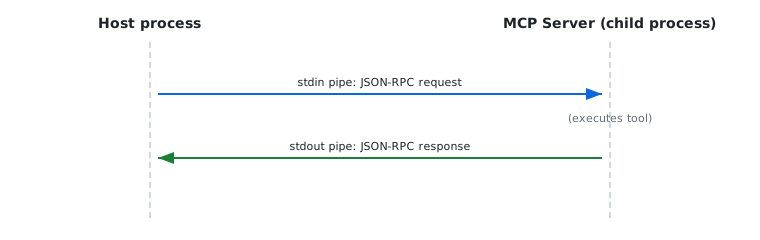
This is exactly how LSP works (VSCode ↔ language server), and MCP borrowed the idea directly. The advantage is zero latency overhead — no TCP handshake, no TLS, no HTTP headers. The server is a process on the same machine; you just pipe bytes to it.
When to use: any tool that runs locally. File system access, local databases, shell commands, code execution, local LLM inference.
4.2 Streamable HTTP — remote tools
For MCP servers running on a different machine (cloud APIs, shared team tools, SaaS integrations), the config looks different:
{
  "mcpServers": {
    "weather": {
      "type": "streamable-http",
      "url": "https://weather-mcp.example.com/mcp"
    }
  }
}
The presence of "url" (and no "command") means Streamable HTTP transport. The server exposes a single HTTP endpoint. The client sends JSON-RPC requests as POST to that endpoint. The server can respond in two ways:
Simple response: a regular HTTP response with a JSON body containing one JSON-RPC response. This is the normal case for quick tool calls.
Streaming response: the server sets Content-Type: text/event-stream and uses Server-Sent Events (SSE) to send multiple JSON-RPC messages — progress notifications, partial results, and the final response. This is for long-running operations where the client needs intermediate updates.
Try it: It's just HTTP
Because Streamable HTTP is standard, you can explore a live public MCP server with curl.
1. Initialize (and get Session ID):
curl -i -X POST https://remote.mcpservers.org/fetch/mcp \
  -H "Content-Type: application/json" \
  -H "Accept: application/json, text/event-stream" \
  -H "MCP-Protocol-Version: 2024-11-05" \
  -d '{
    "jsonrpc": "2.0", "id": 1, "method": "initialize",
    "params": { "protocolVersion": "2024-11-05", "capabilities": {}, "clientInfo": {"name": "curl", "version": "1.0"} }
  }'
2. List Tools (use the Mcp-Session-Id from Step 1):
curl -X POST https://remote.mcpservers.org/fetch/mcp \
  -H "Content-Type: application/json" \
  -H "Accept: application/json, text/event-stream" \
  -H "MCP-Protocol-Version: 2024-11-05" \
  -H "Mcp-Session-Id: <UUID_FROM_STEP_1>" \
  -d '{
    "jsonrpc": "2.0", "id": 2, "method": "tools/list", "params": {}
  }'
Header Requirements. To fully comply with Streamable HTTP, clients MUST send the Accept: application/json, text/event-stream header (indicating they can handle a streaming upgrade) and the MCP-Protocol-Version header. If the server returns an Mcp-Session-Id, the client MUST include it in subsequent requests to maintain state. Servers also validate the Origin header to prevent DNS rebinding attacks.
The client can also open a GET request to the same endpoint to receive server-initiated notifications (capability changes, log messages) as an SSE stream.
When to use: any tool that runs remotely. Cloud-deployed tool servers, shared infrastructure, third-party integrations. Also when multiple clients need to connect to the same server — stdio is 1:1 (one child process per host), Streamable HTTP is many:1.
4.3 What about SSE?
The original MCP transport spec (version 2024-11-05) used a standalone "HTTP+SSE" transport that required two endpoints: GET /sse to open the event stream, and POST /message to send requests. This was awkward — two URLs for one logical connection.
The 2025-03-26 spec revision replaced it with Streamable HTTP, which consolidates everything into a single endpoint. Important distinction: "Streamable HTTP" is the transport name. It still uses SSE (text/event-stream) as the underlying wire format for streaming responses. But structurally, it behaves like a standard HTTP API rather than a dedicated event pipe. MCP SDKs still support the old format for backward compatibility, but new servers should use Streamable HTTP.
4.4 The config tells you the transport
A quick cheat sheet for reading MCP config files:
| Config has… | Transport | Where server runs |
|---|---|---|
"command" + "args" |
stdio | Local (spawned as child process) |
"url" |
Streamable HTTP | Remote (standalone HTTP server) |
"url" ending in /sse |
SSE (legacy) | Remote (two-endpoint, deprecated) |
Regardless of which transport is used, the JSON-RPC messages inside are identical. A tools/call request looks the same whether it's piped through stdin or POSTed over HTTPS.
Mixing transports
A single host can connect to multiple MCP servers using different transports simultaneously. Local file tools over stdio, a remote database over Streamable HTTP, a local code executor over stdio — all active at once, all speaking the same JSON-RPC messages. The combined tool list from all servers becomes the agent's total skill set.
4.5 How to Stop a Server (Shutdown)
JSON-RPC 2.0 has no exit method. MCP relies on the transport layer to signal shutdown:
Stdio: The client closes the server's standard input (stdin). The server must detect this EOF event and exit immediately. This is why your server code needs to handle stdin closure gracefully.
HTTP: Shutdown is transport-specific (closing the event stream or connection) or handled via session timeouts.
5. How Agents See Tools
In Article 3, we built a JSON-RPC server with a methods object — a registry mapping method names to functions. An MCP server has an identical structure: a registry mapping tool names to implementations, each with a schema describing its inputs.
This is not a coincidence. An agent's "skill set" is exactly a JSON-RPC method registry:
| Agent concept | JSON-RPC / MCP equivalent |
|---|---|
| Agent's skill | Registered tool (method + inputSchema) |
| Skill manifest | tools/list response |
| Using a skill | tools/call request |
| Adding a skill | Connecting to a new MCP server |
| Skill description | Tool's description + inputSchema |
| Dynamic capabilities | notifications/tools/list_changed |
The power of this model is composability. Your agent connects to 3 MCP servers: a file system server (5 tools), a database server (3 tools), and a weather server (2 tools). The combined tools/list from all three gives the agent 10 skills. Adding a fourth server — say, a Slack integration — adds more skills without changing any existing code. Remove a server, and those skills disappear.
MCP also supports dynamic tool registration. A server can send a notifications/tools/list_changed notification (fire-and-forget, no id) at any point during a session. When the client receives it, it re-fetches tools/list to get the updated set. This means tools can appear or disappear at runtime — based on authentication state (user logs in, more tools become available), time-based context, or server-side logic. The agent's skill set isn't static; it evolves during the session.
The Missing Link: How tools become "intelligence"
You might wonder: how does the LLM actually "know" the tools exist? The Host takes the JSON-RPC result from tools/list, converts it into text (usually a system prompt), and injects it directly into the LLM's context window. The inputSchema isn't just for validation—it's the actual prompt the model reads.
Security via Interception: Because every tool call is a discrete JSON-RPC message, the Host can pause execution. It can intercept the tools/call request, show it to the user ("Allow 'delete_file'?"), and only forward the message to the Server if the user approves. This "Human-in-the-Loop" security is native to the protocol's design.
This is the same plugin architecture pattern that made VSCode successful (via LSP), applied to AI agents. And the underlying protocol is the same: JSON-RPC 2.0.
6. Build It: A Minimal MCP Tool Server
Let's build a working MCP tool server. Both the official TypeScript SDK and Python's FastMCP handle the transport and lifecycle plumbing, letting us focus on what matters: defining tools.
npm install @modelcontextprotocol/sdk zodpip install fastmcpHere's a complete server with three tools:
import { McpServer } from "@modelcontextprotocol/sdk/server/mcp.js";
import { StdioServerTransport } from "@modelcontextprotocol/sdk/server/stdio.js";
import { z } from "zod";

const server = new McpServer({
  name: "my-tools",
  version: "1.0.0",
});

// Tool 1: Weather lookup
server.registerTool(
  "get_weather",
  {
    description: "Get current weather for a city. Use when user asks about temperature or conditions.",
    inputSchema: { location: z.string().describe("City name, e.g. 'Tokyo' or 'New York'") }
  },
  async ({ location }) => {
    const data = { temp: 72, conditions: "Partly cloudy", location };
    return {
      content: [{ type: "text", text: JSON.stringify(data) }],
    };
  }
);

// Tool 2: Calculator
server.registerTool(
  "calculate",
  {
    description: "Perform arithmetic. Use for any math the user needs computed precisely.",
    inputSchema: {
      operation: z.enum(["add", "subtract", "multiply", "divide"]),
      a: z.number().describe("First operand"),
      b: z.number().describe("Second operand"),
    }
  },
  async ({ operation, a, b }) => {
    let result;
    switch (operation) {
      case "add": result = a + b; break;
      case "subtract": result = a - b; break;
      case "multiply": result = a * b; break;
      case "divide": result = b === 0 ? "Error: Division by zero" : a / b; break;
    }
    return {
      content: [{ type: "text", text: `${a} ${operation} ${b} = ${result}` }],
    };
  }
);

// Tool 3: Current time
server.registerTool(
  "get_time",
  {
    description: "Get current server time in UTC. Use when user asks what time it is.",
    inputSchema: {}
  },
  async () => ({
    content: [{ type: "text", text: new Date().toISOString() }],
  })
);

// Connect via stdio (for local MCP, e.g., Claude Desktop)
async function main() {
  const transport = new StdioServerTransport();
  await server.connect(transport);
}

main().catch((error) => {
  console.error("Server error:", error);
  process.exit(1);
});
import json
from datetime import datetime, timezone
from enum import Enum
from fastmcp import FastMCP
mcp = FastMCP("my-tools")
# Tool 1: Weather lookup (async)
@mcp.tool()
async def get_weather(location: str) -> str:
"""Get current weather for a city. Use when user asks about temperature or conditions.
Args:
location: City name, e.g. 'Tokyo' or 'New York'
"""
# In a real app, you would await an HTTP client here
data = {"temp": 72, "conditions": "Partly cloudy", "location": location}
return json.dumps(data)
# Tool 2: Calculator (sync is fine for CPU-bound tasks)
class Operation(str, Enum):
add = "add"; subtract = "subtract"; multiply = "multiply"; divide = "divide"
@mcp.tool()
def calculate(operation: Operation, a: float, b: float) -> str:
"""Perform arithmetic. Use for any math the user needs computed precisely.
Args:
operation: The math operation
a: First operand
b: Second operand
"""
if operation == Operation.add: return f"{a} + {b} = {a+b}"
if operation == Operation.subtract: return f"{a} - {b} = {a-b}"
if operation == Operation.multiply: return f"{a} * {b} = {a*b}"
if operation == Operation.divide:
return "Error: Division by zero" if b == 0 else f"{a} / {b} = {a/b}"
return "Unknown operation"
# Tool 3: Current time
@mcp.tool()
async def get_time() -> str:
"""Get current server time in UTC. Use when user asks what time it is."""
return datetime.now(timezone.utc).isoformat()
if __name__ == "__main__":
mcp.run()That's a complete, working MCP server in either language. Under the hood, both SDKs handle the JSON-RPC lifecycle identically: respond to initialize, serve tools/list from registered tools, dispatch tools/call to the right handler, validate params against schemas (Zod in TS, type annotations in Python), and format responses as proper JSON-RPC messages.
Notice how FastMCP uses the function's docstring as the tool description and Python type hints as the inputSchema — the JSON-RPC contract is generated automatically from your function signature.
Tip: Debugging with Inspector
Connecting blindly to Claude Desktop can be frustrating. Use the MCP Inspector to test your server in the browser first.
npx @modelcontextprotocol/inspector npx tsx server.ts` # Node/TSnpx @modelcontextprotocol/inspector python server.py` # PythonThis launches a web UI where you can list tools, call them manually, and see the raw JSON-RPC traffic.
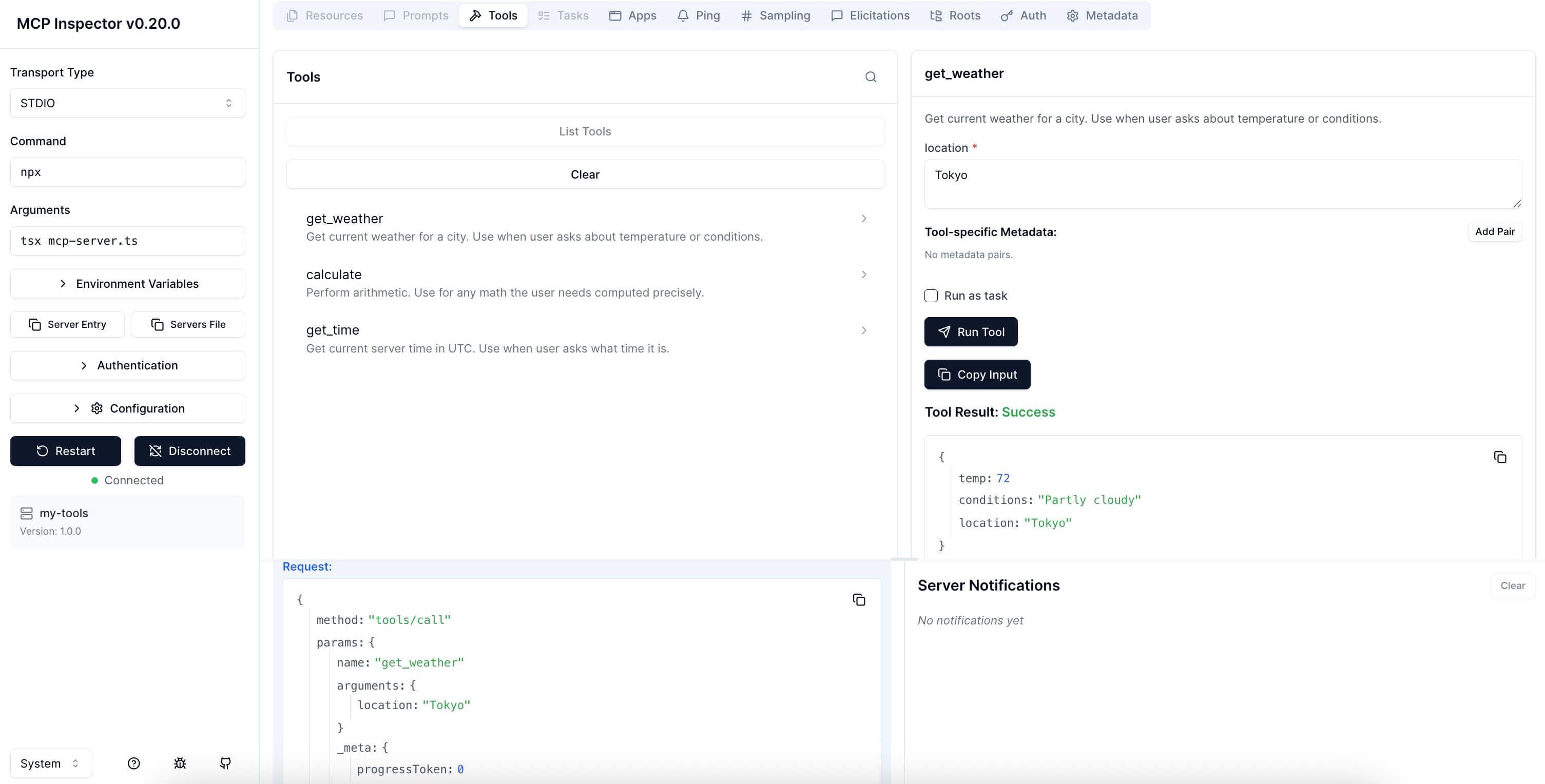
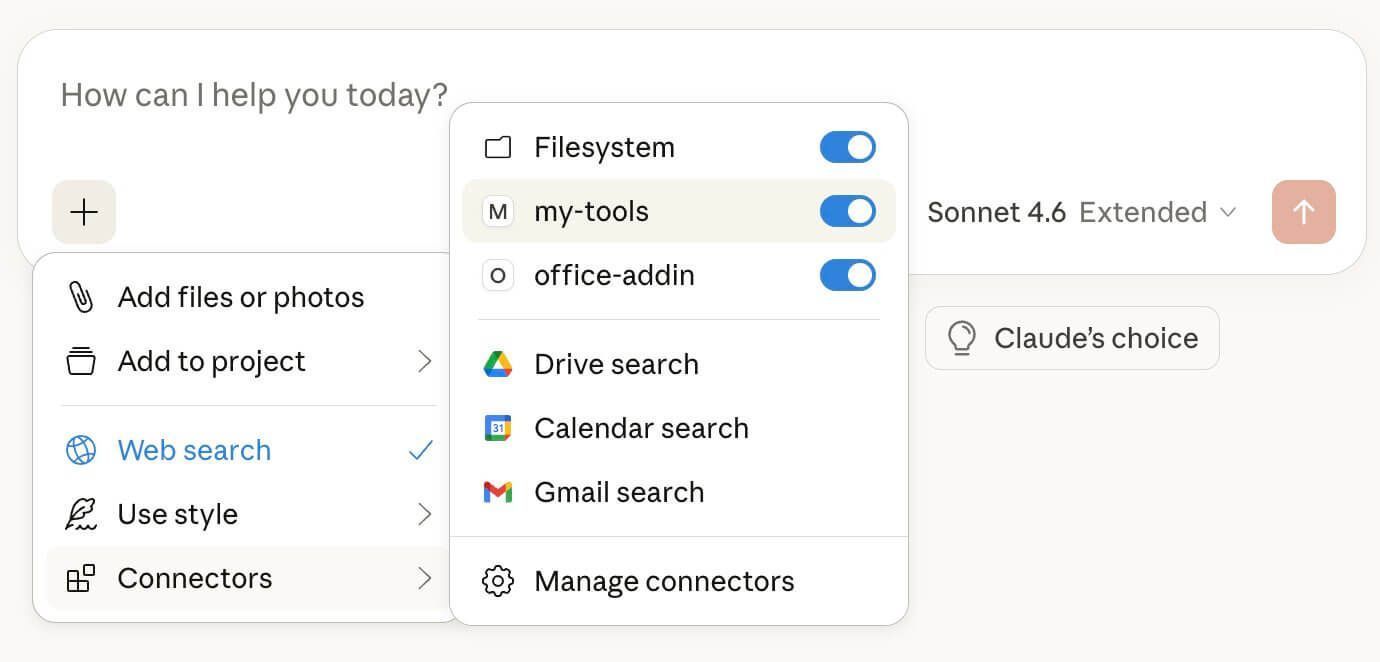
To use this with Claude Desktop, add it to your claude_desktop_config.json:
{
  "mcpServers": {
    "my-tools": {
      "command": "npx",
      "args": ["-y", "tsx", "/absolute/path/to/server.ts"]
    }
  }
}
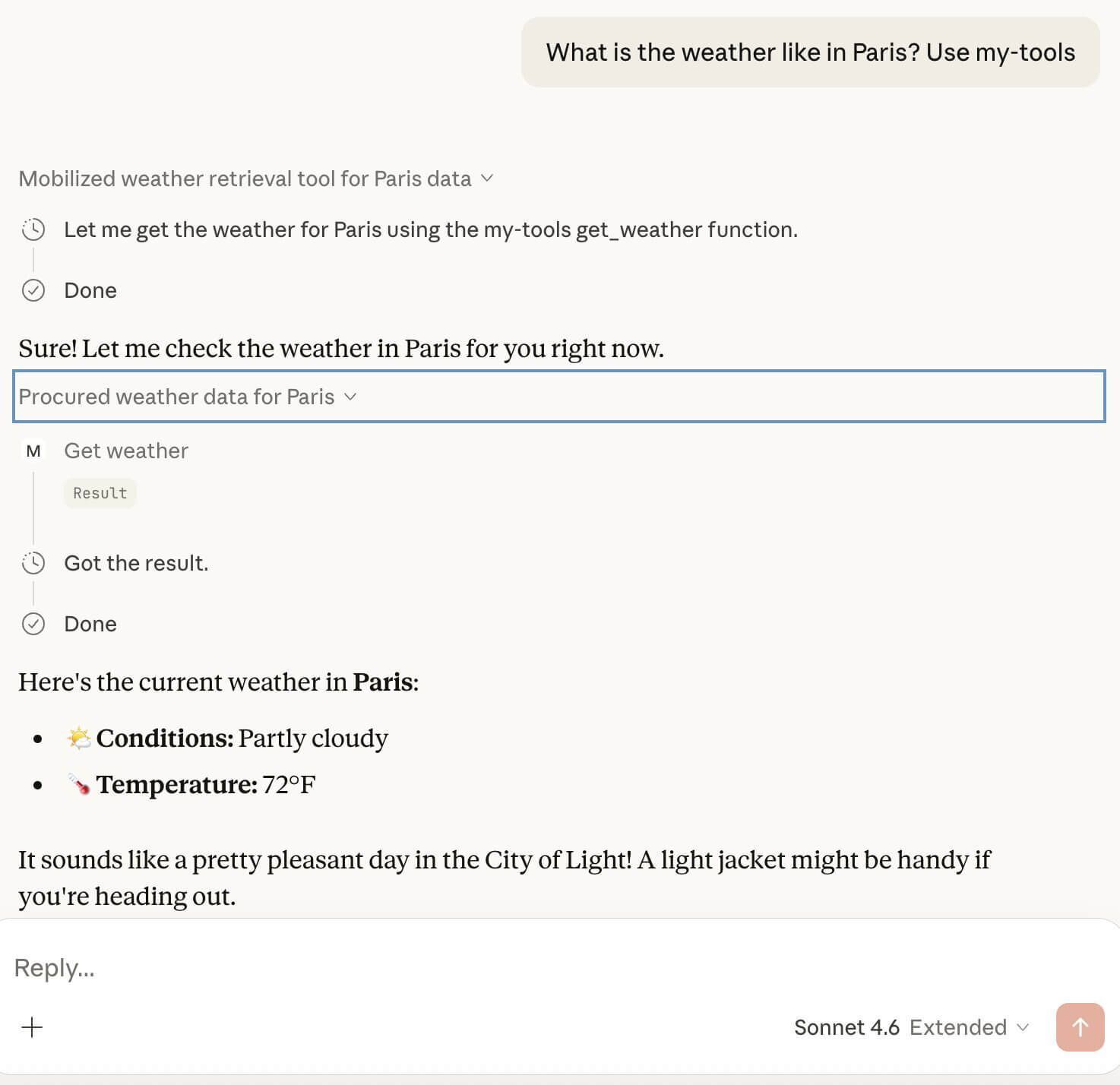
7. Best Practices for Tool Design
Building the server is the easy part. Designing tools that LLMs can actually use reliably is where most people struggle. Here's what we've learned:
Descriptions are prompts. The description field is read by the LLM to decide when to call your tool. Write it like an instruction: "Search for files by name or content in the workspace. Returns file names, sizes, and last modified dates. Use when the user asks to find a file or document." Vague descriptions like "File search utility" lead to unreliable tool selection.
Keep schemas flat. Deeply nested input objects increase token count and parsing errors. If your tool needs complex input, consider splitting it into multiple simpler tools. A flat {"query": "string", "limit": "integer"} is far more reliable than a nested {"filter": {"conditions": [{"field": "...", "op": "...", "value": "..."}]}}.
Use enums for constrained choices. If a parameter has a fixed set of valid values, use "enum": ["add", "subtract", "multiply"] in the schema. The LLM will stick to these values. Without the enum, it might hallucinate invalid options.
Mark required fields explicitly. The "required": ["location"] array tells the LLM which fields it must include. Without it, the model may omit critical parameters.
Return structured content. Return results as JSON strings in the content array. The LLM can parse structured data far more reliably than free-form text. Include only the fields the model needs to formulate its response.
Separate protocol errors from tool errors. If the tool name doesn't exist, throw a JSON-RPC error (-32602). If the tool ran but the external API returned an error, return result with isError: true. This distinction helps clients handle failures appropriately.